Context and challenge
A large services company receives dozens of bank payments every day, each of which must be matched to a specific invoice. The bank only provides a general list of transactions without the invoice number, which makes the process entirely manual.
Before the solution was implemented, the accounting department worked in Excel and faced problems such as:
- no centralized structure and manual reconciliation of data;
- lost pending invoices and difficulty finding them;
- daily overload for staff and a high risk of errors;
- significant delays in the period-end close.
With more than 580 invoices a month and more than 7,000 transactions a year, this process was becoming inefficient, slow and unreliable.
Main challenge: to move from a fragmented process in Excel to a unified digital platform, where payments are reconciled with invoices automatically, quickly and transparently.
Business objectives
The key objectives were defined together with the company:
- Reduce manual work by 50–70%.
- Eliminate lost invoices and human error.
- Ensure 100% transparency in the process.
- Leave Excel behind and migrate to a centralized digital system.
- Reduce payment processing time to a few minutes.
- Create a self-learning mechanism to improve accuracy over time.
Solution: an intelligent system for automated payment reconciliation
A unified platform was developed that fully automates the process:
- uploading Norma43 bank statements;
- retrieving pending invoices from the ERP;
- reconciling transactions with invoices using three independent matching methods;
- presenting suggestions to the accountant for validation;
- sending approved matches back to the ERP;
- storing the transaction history and learning from the company's own data.
Three independent matching methods
A. Search by invoice number (regex)
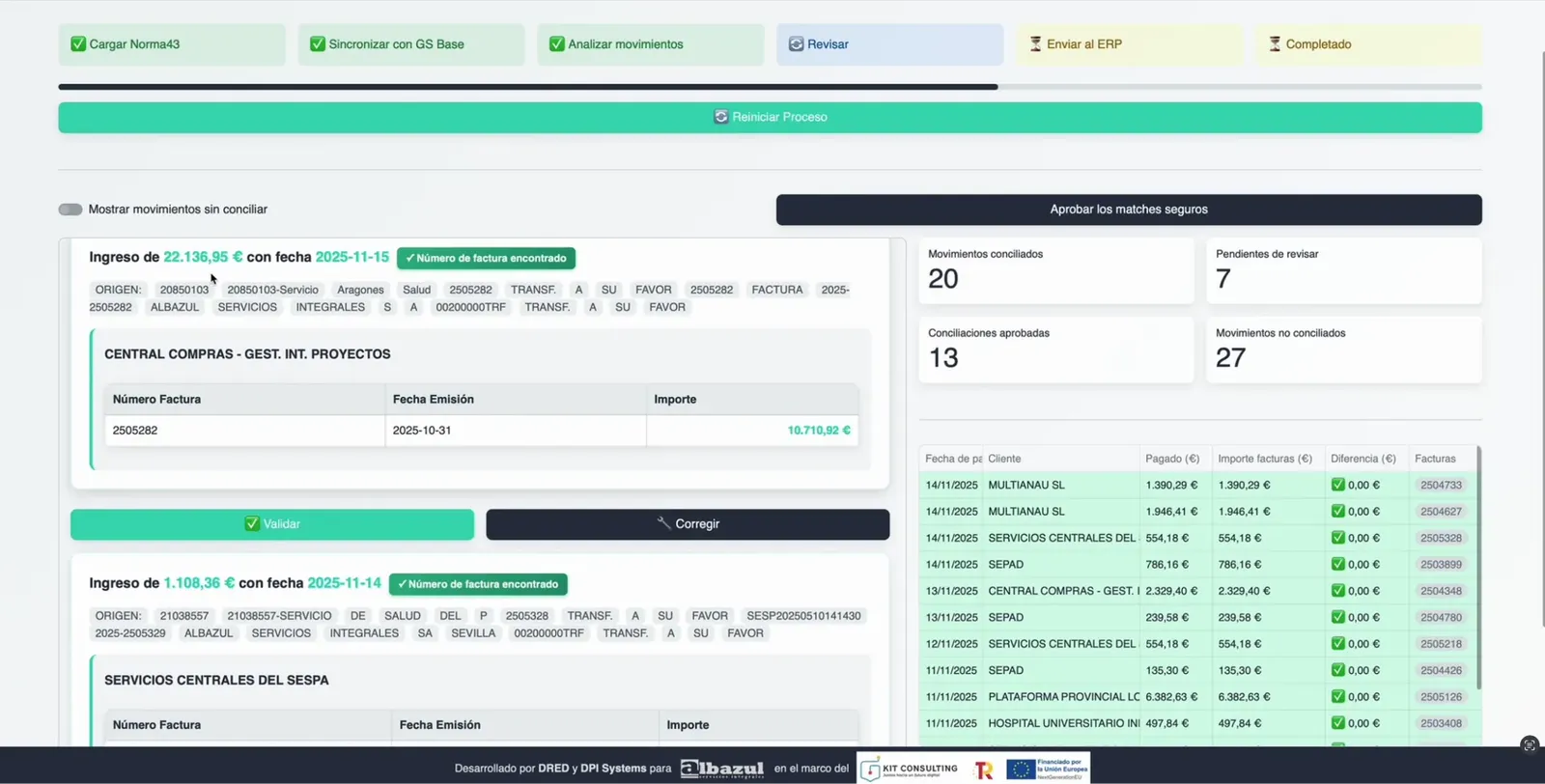
If an invoice number is detected in the payment reference, the match is identified instantly. The label shown is: “Invoice number found”.
B. Matching by amounts and combinations
The algorithm analyzes multiple scenarios:
- full matches;
- partial payments;
- combinations of several invoices using optimized backtracking.
C. “Client Fingerprints”
The system analyzes historical data and extracts unique patterns for each client using clustering techniques and ML algorithms such as DBScan, which makes it possible to identify matches from each client's payment behavior.
How the system works
1. Norma43 upload
File upload → cleaning → standardization → storage in PostgreSQL.
2. Retrieving pending invoices (ERP)
The up-to-date list of open invoices is retrieved via API.
3. Reconciliation algorithms
The three methods (invoice number, amounts and client fingerprints) run in parallel.
4. Interface for the accountant (Streamlit)
The platform makes it possible to:
- view the list of payments;
- analyze suggested matches;
- understand the logic used by the system;
- approve, correct or reject results.
5. Integration with the ERP
Approved matches are sent to the ERP automatically. The system builds a transaction history and updates the client fingerprints.
6. Management via API
The backend runs the processing as a pipeline:
Upload → Update → Clean → Matching → Clean → Return Predictions.
Project implementation stages
The project was completed in 8 weeks, following this structure:
Stage 1 — Process analysis
- audit of the current Excel model;
- identification of the causes of lost invoices;
- design of a new architecture.
Stage 2 — Backend
- Norma43 upload;
- data standardization;
- ERP integration;
- creation of the database structure.
Stage 3 — Reconciliation algorithm
- regex search;
- amounts and combinations logic;
- client fingerprints.
Stage 4 — Streamlit interface
- dashboard;
- explanation of the matching logic;
- validation and correction tools.
Stage 5 — Integration and learning
- sending to the ERP;
- updating historical data;
- recalculating behavior patterns.
Difficulties and solutions
- Complex, heterogeneous text in Norma43 → solved through standardization and cleaning.
- Combinatorial reconciliation logic → optimized backtracking implemented.
- Replacing Excel → design of a clear, intuitive visual interface.
- Strict ERP requirements → deep integration and data protection.
- Guaranteeing no invoices are lost → mandatory check of “leftovers”.
Results achieved
- Processing time cut by up to 70%
Manual work was almost entirely replaced by automation.
- Greater accuracy and no errors
The algorithm doesn't get tired and doesn't make human errors.
- Zero lost invoices
The system always shows pending invoices.
- Excel eliminated
All work is centralized on a single platform.
- Speed: minutes instead of hours
After the Norma43 upload, matches appear almost immediately.
- Self-learning system
Accuracy increases with every validation cycle.
- Complete transaction history
Every reconciliation is recorded for analysis and audit.
Conclusion
In just 8 weeks, a modern, automated bank reconciliation system was built that:
- processes tens of thousands of transactions;
- saves dozens of hours of work every month;
- eliminates errors and information loss;
- is fully integrated with the ERP;
- becomes more accurate with every use.
An ideal solution for companies that handle a high volume of payments and want to increase the accuracy, speed and transparency of their financial processes